p3 — The Heisenberg experiment (closed-loop conditioning)
Goal: ask whether a walking fly learns to avoid one visual orientation when entering that part of its closed-loop panorama triggers LED/laser stimulation. P3 is a tribute to Martin Heisenberg, Reinhard Wolf, Marcus Dill, Aike Guo, and the flight-simulator lineage they developed.
Status: five named P3 stimulus families are ready for instructor-led runs, each in short and full form. Every protocol uses only the validated −1.8 deg/frame closed-loop coupling; gain and pattern identity are not student variables. Cue A is always reinforced, the default conditional LED level is 25%, and the default activation stock is hot cell. P1, Moonwalker, and other validated activation lines are reasonable alternatives when they are recorded in the run metadata and approved by the instructor.
The earlier generic and positive-gain P3 YAMLs have been retired and must not be used.
Files: choose one named stimulus protocol below. Short protocols take ≈8 min and full protocols ≈18 min. Fly-on-ball rig. Requires FicTrac and the Arena Studio web runner.
Open in Arena Studio
These links open the shared protocols in the Run view and force safe mode. Choose the short version first, then the full version if the fly and tracking look healthy.
| Stimulus family | Short | Full |
|---|---|---|
| Classic T figures | Open short | Open full |
| High/low bars | Open short | Open full |
| Left/right slashes | Open short | Open full |
| Relational slashes | Open short | Open full |
| Dill random checkers | Open short | Open full |
The conditional LED feature is web-runner-only.
Pattern previews
Each movie has cue A twice and cue B twice, alternating every 90 degrees. Pick one pattern pair before the run and use it throughout baseline, training, and the no-light probe.
| 1. Classic T figures | 2. High/low bars | 3. Left/right slashes |
|---|---|---|
 |  |  |
| 4. Relational slashes | 5. Dill random squares |
|---|---|
 | 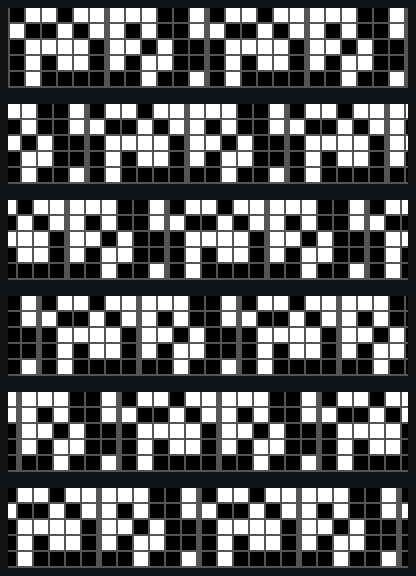 |
The historical pattern menu
Each choice now has a phase-0 pattern and an exact 50-frame-shifted phase-90 partner. Students select the corresponding named protocol; they do not edit pattern names or IDs inside the YAML.
| Choice | Phase-0 name / ID | Phase-90 name / ID | Student-facing stimulus |
|---|---|---|---|
| 1 | p3_heisenberg_ts / 36 | p3_heisenberg_ts_shift90 / 41 | Classic upright/inverted T figures |
| 2 | p3_heisenberg_high_low / 37 | p3_heisenberg_high_low_shift90 / 42 | High versus low horizontal bars |
| 3 | p3_heisenberg_slashes / 38 | p3_heisenberg_slashes_shift90 / 43 | +45° versus −45° slashes |
| 4 | p3_heisenberg_relational / 39 | p3_heisenberg_relational_shift90 / 44 | Relational upper/lower slash pair |
| 5 | p3_dill_random_checkers / 40 | p3_dill_random_checkers_shift90 / 45 | Dill-style randomized square textures |
The T figures use the classic approximately 40° figure size and 14° bar width. The checker texture uses 12.6° checks with 1.8° gaps, the closest whole-pixel G6 match to Dill et al.’s 12.9° checks and 1° gaps. Its first 180° are repeated over the second 180°, as in the paper.
Pattern choice in the protocol
Each YAML hardcodes one phase-0/phase-90 name-and-ID pair. Its sibling pattern folder contains only the course background and those two pattern files. This keeps name resolution, numeric SD fallback, and run metadata aligned without student editing.
What the fly controls
All five patterns use the same 200-frame coordinate system:
- cue A is centered in front at frames 25 and 125;
- cue B is centered in front at frames 75 and 175;
- each frame is 1.8° and each 50-frame quadrant is 90°;
- FicTrac turning moves the panorama in Mode 3 closed loop at a fixed gain of −1.8 deg/frame. This sign and magnitude are part of P3 and must not be edited.
Cue A is always reinforced in the released course YAMLs. Pattern choice is the student-controlled variable; do not change the cue-A on_ranges unless an instructor is deliberately running a counterbalanced extension.
Every phase is split into 20-second closed-loop trials. Each protocol hard-pins the bridge offset to zero, performs no offset calculation, and does not attempt to impose a starting frame. Instead, it alternates the phase-0 and phase-90 source patterns. At the same FicTrac-derived frame index, the phase-90 pattern displays source frame (index + 50) mod 200. Thus every trial boundary swaps the panorama by exactly 90° without changing the ball-to-frame mapping. This swaps which cue occupies the fly’s current visual direction; it does not claim to center a cue at geometric front.
What the LED/laser does
During training, Arena Studio’s led_activation watches the live displayed frame index and turns the BuckPuck-driven LED/laser on only in the assigned quadrants. Because the phase-90 file shifts the visual panorama by 50 frames, its LED sectors must shift too so that the same physical cue A is reinforced. The released default is 25% with no hysteresis:
| Trial pattern | Cue-A inclusive on-ranges |
|---|---|
| Phase 0 | [[0, 49], [100, 149]] |
| Phase 90 | [[50, 99], [150, 199]] |
Baseline and probe blocks use the same visual pattern with stimulation off. The light is forced off at each trial boundary and every transition is recorded in the run log.
Twenty-second anti-sticking trials
Each trial uses the same command bracket:
trialParams -> startClosedLoop -> wait 20 s -> stopClosedLoop
The next trial begins immediately with the other 90° pattern phase. This prevents one uninterrupted multi-minute visual state and gives a stuck fly a large visual reset without changing the closed-loop transformation or total stimulation time. It does not physically move the fly, so immobility remains an analysis/QC measure.
Experiment structure
Short pilot (about 8 min)
| Phase | 20 s trials | Time | Stimulation |
|---|---|---|---|
| Baseline | 6 | 2 min | Off |
| Training | 12 | 4 min | Gated by orientation |
| Probe | 6 | 2 min | Off |
Total: 24 trials × 20 s = 480 s = 8 min of visual trials. Including the 3-second gray start and 1-second shutdown, wall-clock time is about 8 min 4 s, plus small command overhead.
Full experiment (about 18 min)
| Phase | 20 s trials | Time | Stimulation |
|---|---|---|---|
| Baseline | 12 | 4 min | Off |
| Training 1 | 12 | 4 min | Gated by orientation |
| Probe 1 | 6 | 2 min | Off |
| Training 2 | 12 | 4 min | Gated by orientation |
| Final probe | 12 | 4 min | Off |
Total: 54 trials × 20 s = 1,080 s = 18 min of visual trials. Including the 3-second gray start and 1-second shutdown, wall-clock time is about 18 min 4 s, plus small command overhead. Baseline and final probe can still be analyzed as two 2-min bins.
This follows the standard timing used in the classic flight-simulator work. An optional later comparison will use fixed open-loop cue presentations alternating every 3 s, followed by the same closed-loop probe.
What to watch
- During training, does the fly leave reinforced sectors and remain longer in unreinforced sectors?
- During the no-light probe, does that orientation preference persist?
- Does the result depend on which historical pattern pair the student chose?
- Is apparent preference actually long immobility? Inspect walking fraction and dwell times together with occupancy.
Analysis plots
- Full 200-bin displayed-frame-index occupancy for every baseline/probe bin.
- Normalize phase-90 trials before pooling them:
cue_aligned_index = (displayed_index + 50) mod 200; phase-0 trials use the displayed index unchanged. - Cue-aligned quadrant occupancy and the classic preference index:
(time safe - time reinforced) / total time. - Baseline-corrected probe preference per fly and across training cycles.
- Dwell-time distributions in reinforced and safe quadrants.
- LED-transition events overlaid on training arena index.
- Forward velocity, turning velocity, moving fraction, and immobility QC.
- Class summary grouped by
pattern_name, reinforced cue, genotype, and sex.
Why these five patterns?
- Upright/inverted T figures are the canonical Wolf-Heisenberg landmarks.
- High/low bars reduce the problem to vertical position.
- Opposite slashes test the robust edge-orientation feature.
- The two-slash pair tests a relational cue: which orientation is above which.
- Random squares honor Dill’s highly learnable full-field texture experiment and test learning without a single compact landmark.
References
- Heisenberg M, Wolf R (1984). Vision in Drosophila: Genetics of Microbehavior. https://doi.org/10.1007/978-3-642-69936-8
- Wolf R, Heisenberg M (1991). Basic organization of operant behavior as revealed in Drosophila flight orientation. https://doi.org/10.1007/BF00194898
- Dill M, Wolf R, Heisenberg M (1995). Behavioral analysis of Drosophila landmark learning in the flight simulator. https://doi.org/10.1101/lm.2.3-4.152
- Guo A, Li L, Xia S-Z, Feng C-H, Wolf R, Heisenberg M (1996). Conditioned visual flight orientation in Drosophila: dependence on age, practice, and diet. https://doi.org/10.1101/lm.3.1.49
- Brembs B, Heisenberg M (2000). The operant and the classical in conditioned orientation of Drosophila melanogaster at the flight simulator. https://doi.org/10.1101/lm.7.2.104
- Tang S, Wolf R, Xu S, Heisenberg M (2004). Visual pattern recognition in Drosophila is invariant for retinal position. https://doi.org/10.1126/science.1099839
Updated 2026-07-10 for the named P3 protocol set. Pattern source: patterns/p3_conditioning/; shared pattern library and SD bundle: patterns/.