Pattern Editor
The Pattern Editor is the web tool for making .pat files for the LED arena. You can generate gratings, looming-like expansions, bars, edges, image patterns, and multi-frame animations, then save them for Arena Studio protocols.
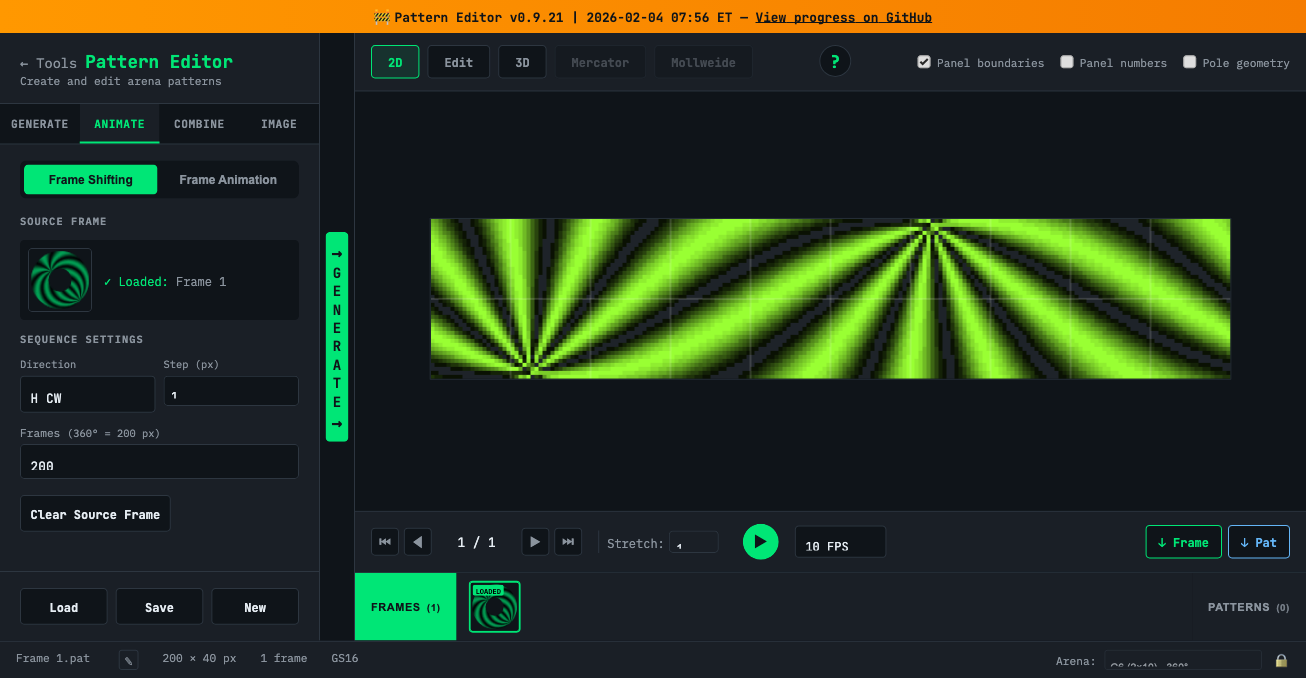
Open the editor: https://reiserlab.github.io/webDisplayTools/pattern_editor.html
Full quick start: https://github.com/reiserlab/webDisplayTools/blob/main/PATTERN_EDITOR_QUICKSTART.md
Basic workflow
- Choose the arena. For the course rigs, use the G6 2-row × 10-column arena unless an instructor tells you otherwise.
- Generate or load a pattern. Use the Generate tab for mathematical patterns, or Load to inspect an existing
.patfile. - Preview it. Use the 2D/3D/Mercator/Mollweide viewers and playback controls to make sure the motion and orientation are what you expect.
- Save the
.patfile. Give it a short, descriptive name. - Use it in Arena Studio. Add the pattern to a protocol, run a test first, and only record data after the stimulus is correct.
Generate tab
Use this tab for most course patterns.
- Square Grating: sharp bright/dark stripes.
- Sine Grating: smooth sinusoidal stripes.
- Starfield: random dot field for optic-flow-style stimuli.
- Edge: a single contrast edge or graded edge.
- Off/On: full-field single-frame patterns.
Key settings:
| Setting | What it controls |
|---|---|
| Motion type | Rotation, expansion, or translation. |
| Pole azimuth/elevation | Where the pattern is centered on the arena. |
| Spatial frequency | Wavelength in pixels or degrees. |
| Duty | Fraction of each cycle that is bright. |
| Step size | How much the pattern advances per frame. |
| Mode | Binary or grayscale output. |
Animate tab
Use this tab when you want to turn static frames into an animation.
- Frame shifting: move one captured frame horizontally or vertically over a fixed number of frames.
- Frame animation: build a custom sequence from multiple captured frames.
Combine tab
Use this tab to merge two patterns. Common uses are splitting the arena into two regions, masking one pattern with another, or concatenating two animations.
Image tab
Use this tab to convert a PNG or JPEG into an arena pattern. This is useful for custom shapes, object silhouettes, and quick visual mockups.
Practical checks before saving
- Confirm the stimulus is built for the correct arena geometry.
- Play the animation and check the first and last frames.
- Check whether the pattern should end by holding its final frame or looping.
- Use short, unique names that will make sense in a protocol file.
- Ask someone else to look at the preview before recording a real experiment.
Course task
By the end of the course day, each team should make at least one pattern and understand how it would be added to an Arena Studio protocol.
Updated 2026-07-10 01:47 ET.