Pattern Tools Quick Start Guide
A quick reference for the Reiser Lab’s MATLAB pattern generation tools.
The Three Apps
| App | Purpose |
|---|---|
| PatternGeneratorApp | Create patterns (gratings, starfields, edges) |
| PatternPreviewerApp | View, animate, and export patterns |
| PatternCombinerApp | Combine two patterns into one |
The Previewer is the central hub—Generator and Combiner automatically send their output to it.
Getting Started
% Add tools to path (run once per session)
addpath(genpath('/path/to/maDisplayTools'));

% Launch apps individually
PatternGeneratorApp    % Create new patterns
PatternPreviewerApp    % View/export patterns
PatternCombinerApp     % Combine patterns
Launching & Arranging Apps
For convenience, you can launch all three apps at once:
open_pattern_apps % Opens Generator, Previewer, and Combiner together
Window positions: To save your preferred window layout:
- Arrange the windows where you want them
- Run
save_pattern_app_layoutto remember the positions
Closing apps:
- Click the Close Pattern Apps button in PatternPreviewerApp, or
- Run
close_pattern_appsfrom the command line
Pattern Organization
Patterns are saved in folders named after their arena config:
patterns/
  G6_2x10/              ← Directory name = arena config name
    grating_30deg.pat
    starfield_100dots.pat
  G6_2x8of10/
    edge_pattern.pat
  G41_2x12_cw/
    ...
Don’t worry! If you start with a blank directory and use PatternGeneratorApp, patterns will automatically be named and saved to the correct folder.
Why this matters: The Previewer auto-detects arena settings from the folder name, which enables the projection views (Mercator, Mollweide).
Available Arena Configs
Standard configurations in configs/arenas/:
| Config | Gen | Grid | Coverage | Use Case |
|---|---|---|---|---|
G6_2x10 | G6 | 2×10 | 360° | Full G6 arena |
G6_2x8of10 | G6 | 2×8 of 10 | 288° | G6 with rear gap |
G6_3x12of18 | G6 | 3×12 of 18 | 240° | Large G6, rear gap |
G41_2x12_cw | G4.1 | 2×12 | 360° | G4.1 arena, c0 at south |
G4_4x12 | G4 | 4×12 | 360° | Full G4 arena |
G4_3x12 | G4 | 3×12 | 360° | 3-row G4 arena |
G4_3x12of18 | G4 | 3×12 of 18 | 240° | G4 with rear gap |
G3_4x12 | G3 | 4×12 | 360° | G3 arena |
G3_3x24 | G3 | 3×24 | 360° | G3 arena |
Partial arenas (e.g., 2x8of10) have fewer columns installed than the full grid, leaving gaps for equipment access.
Note: G3 configs are included for backward compatibility but are not fully supported or tested.
Typical Workflow
┌─────────────────────┐    Generate &       ┌─────────────────────┐
│ PatternGeneratorApp │ ──────────────────→ │ PatternPreviewerApp │
│                     │      Preview        │                     │
│      [Save]         │                     │   View / Export     │
└─────────────────────┘                     └─────────────────────┘
                                                     ↑
┌─────────────────────┐    Combine &                 │
│ PatternCombinerApp  │ ────────────────────────────→│
│                     │      Preview
│      [Save]         │
└─────────────────────┘
Creating a Pattern (Generator Workflow):
- Launch PatternGeneratorApp
- Select your arena config (dropdown at top)
- Configure pattern type, motion, and parameters
- Click Generate & Preview → pattern appears in Previewer
- Review in Previewer (play animation, check histogram)
- Click Save in Generator to save the pattern
Tip: Both Generator and Combiner suggest reasonable filenames when saving, but they won’t capture every parameter. Review the proposed name and edit it to something descriptive enough to help you identify the pattern later.
Help: Click the ? button in PatternGeneratorApp to open a window with more details about each parameter.
(For combining patterns, see the PatternCombinerApp section below.)
PatternGeneratorApp
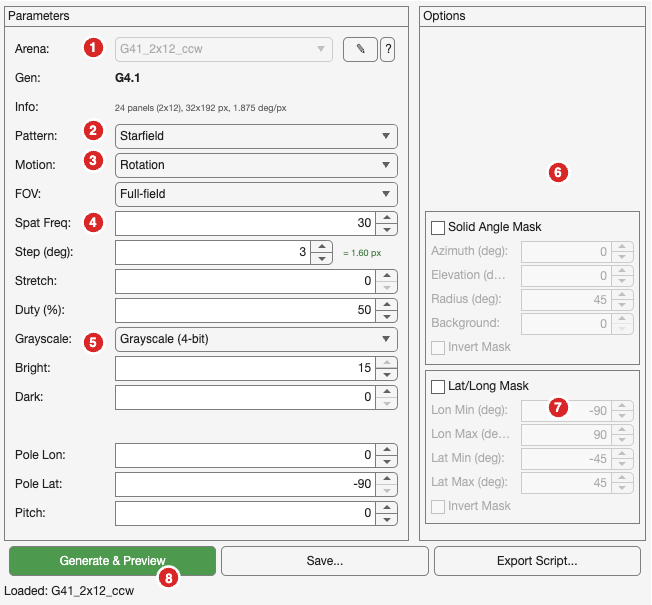
| # | Control | Description |
|---|---|---|
| 1 | Arena dropdown | Select hardware config (locked after generating) |
| 2 | Pattern type | Square Grating, Sine Grating, Edge, Starfield, Off/On |
| 3 | Motion type | Rotation, Translation, Expansion-Contraction |
| 4 | Spatial freq | Width of pattern bars in degrees |
| 5 | Grayscale | Binary (1-bit) or Grayscale (4-bit, 16 levels) |
| 6 | Solid Angle Mask | Circular masking by azimuth/elevation/radius |
| 7 | Lat/Long Mask | Rectangular masking by longitude/latitude bounds |
| 8 | Generate & Preview | Create pattern and send to Previewer |
Other controls: Step size (movement per frame), Stretch (timing), Duty cycle, Bright/Dark intensity levels.
Tips:
- Arena is locked after generating; click “Change Arena” to unlock (clears pattern)
- Use “Export Script” to save a reproducible MATLAB script
PatternPreviewerApp
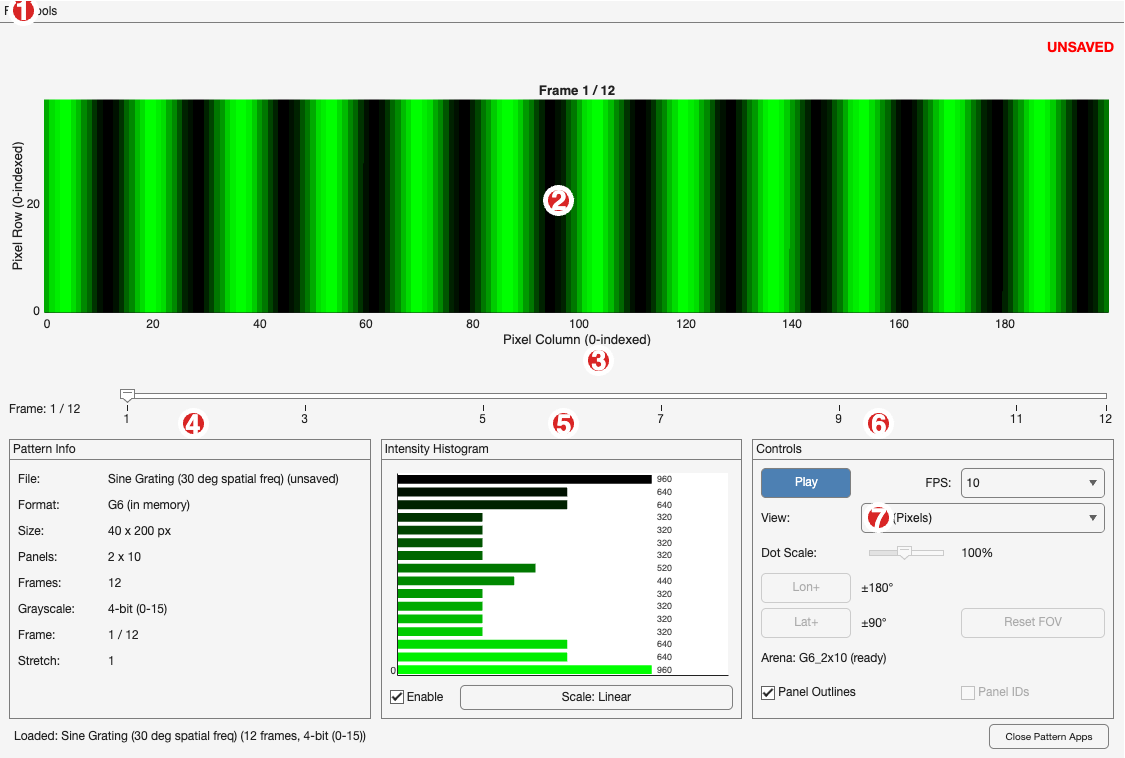
| # | Control | Description |
|---|---|---|
| 1 | File menu | Load Pattern, Export GIF, Export Video |
| 2 | Main display | Pattern visualization with panel grid |
| 3 | Frame slider | Navigate frames manually |
| 4 | Pattern Info | File name, format, dimensions, grayscale mode |
| 5 | Histogram | Live intensity distribution |
| 6 | Controls | Play/Stop, FPS selection |
| 7 | View mode | Grid (Pixels), Mercator, or Mollweide projection |
Other controls: Panel Outlines checkbox, Panel IDs checkbox, Dot Scale slider (for projections).
View Modes:
- Grid (Pixels): Raw pixel view with optional panel boundaries
- Mercator: Cylindrical map projection (longitude/latitude)
- Mollweide: Equal-area projection (preserves brightness distribution)
Keyboard shortcut: Cmd+O to load a pattern file
PatternCombinerApp
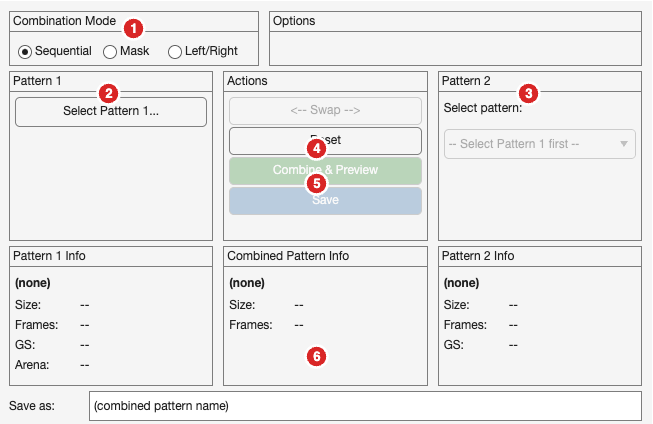
| # | Control | Description |
|---|---|---|
| 1 | Combination Mode | Sequential, Mask, or Left/Right |
| 2 | Pattern 1 | Select the first pattern file |
| 3 | Pattern 2 | Select from compatible patterns in same folder |
| 4 | Combine & Preview | Create combined pattern, send to Previewer |
| 5 | Save | Save combined pattern to disk |
| 6 | Save as | Filename for the combined pattern |
Combination Modes:
| Mode | What it does | Example use |
|---|---|---|
| Sequential | Plays Pattern 1, then Pattern 2 | Multi-phase stimuli |
| Mask (Replace) | Replace pixels at threshold with Pattern 2 | Overlay moving object on background |
| Mask (Blend) | 50% average of both patterns | Superimposed gratings |
| Left/Right | Left half from Pat1, right from Pat2 | Hemifield experiments |
Note: Pattern 2 dropdown only shows patterns with matching grayscale mode from the same folder.
Tips & Troubleshooting
| Problem | Solution |
|---|---|
| Pattern 2 dropdown is empty | Select Pattern 1 first; only matching grayscale patterns appear |
| Projection views are blank | Pattern must be in a folder named after its arena config |
| “UNSAVED” warning in Previewer | Pattern from Generator/Combiner not yet saved |
| Changes to app not taking effect | Run clear classes in MATLAB, then relaunch the app |
| App won’t launch | Run addpath(genpath('/path/to/maDisplayTools')) first |
Exporting Patterns
From PatternPreviewerApp:
- File → Export GIF: Animated GIF of all frames
- File → Export Video: MP4 video file
From PatternGeneratorApp:
- Save: Saves
.patfile topatterns/{arena}/ - Export Script: Generates MATLAB code to recreate the pattern
Quick Reference Card
Launch:           PatternGeneratorApp / PatternPreviewerApp / PatternCombinerApp
Load pattern:     Cmd+O in Previewer
Pattern folder:   patterns/{arena_config_name}/
Arena configs:    configs/arenas/*.yaml
Reset MATLAB:     clear classes; addpath(genpath('.'));
Further Reading
These tools are based on the G4 Display Tools. For additional details on pattern generation concepts:
Reporting Issues
If you find bugs or have suggestions:
- Open an issue on GitHub: maDisplayTools Issues
- Include: what you were trying to do, what happened, and any error messages
Last updated: January 2026