Help & User Guide
Complete guide to navigating and understanding the neuron type catalog
Contents
Overview
This neuron type catalog provides comprehensive information about neurons in the flywire-fafb:v783b dataset. The catalog includes detailed morphological, connectivity, and functional data for each neuron type, organized into an easy-to-navigate interface.
Quick Start: Use the Types Index to browse all available neuron types, or use the search bar in the header to quickly find specific neurons.
Dataset and Version
This site is connected to neuPrint at https://neuprint-cns.janelia.org using the flywire-fafb:v783b dataset.
Types Index Page
The main index page shows all available neuron types with filtering and search capabilities. Dropdown and text input fields are placed at the top of the page, followed by "cards" that represent a neuron type.
The filters correspond to the tag badges shown on each neuron card. Selecting a value in a dropdown filters the list accordingly.
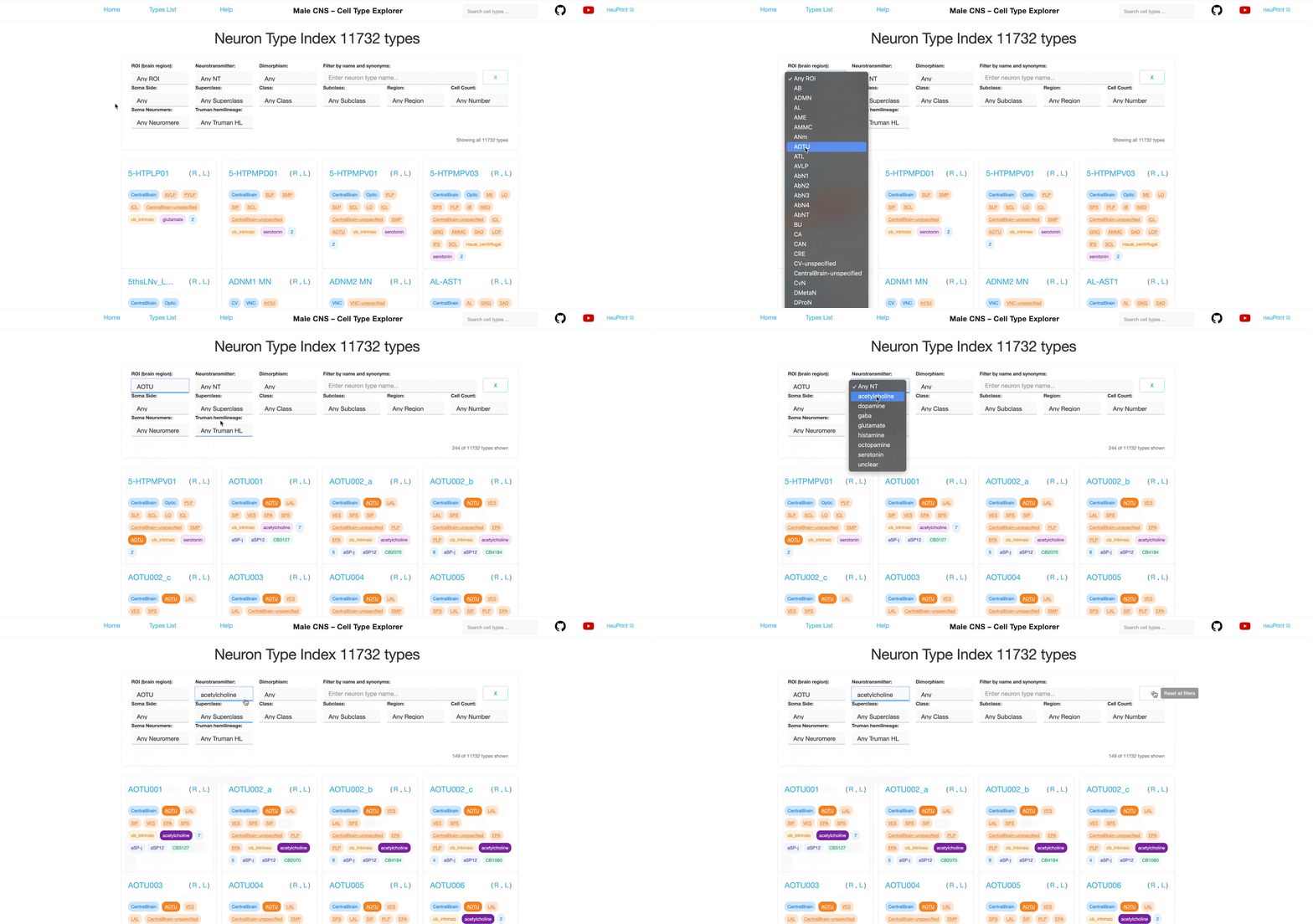
Using Filters
Each dropdown is single‑select. You can combine multiple different filters to further narrow the list; results satisfy all selected filters (AND logic) however each individual filter allows only one selection at a time.
For example, selecting "Glutamate" in the Neurotransmitter filter shows only neuron types that use glutamate as their primary neurotransmitter (defined in the neuPrint database). Additionally selecting "ME" in the ROI filter further narrows the list to neuron types with synapses in the Medulla.
Tip: Many tags are clickable and will filter the list to show related neuron types.
ROI Filter
Filter by ROIs where neurons have synapses. ROIs represent brain regions; neurons are considered to be part of an ROI if they have synapses within it.
ME ROI: Brain regions such as Medulla, Calyx, or superior lateral protocerebrum.
Tip: See the neuPrint help page for a detailed list of ROIs within the database and their parent regions.
NT (Neurotransmitter) Filter
Filter by the primary neurotransmitter used by the neurons:
Acetylcholine Neurotransmitter Tags: Primary neurotransmitter used by the neurons.
Dimorphism Filter
The CNS dataset is based on a male fruit fly. This filter allows selection of neurons that are potentially sexually dimorphic.
Sex-specific Dimorphism Tags: Indicates sex-specific or dimorphic characteristics.
Synonyms
Two types of synonyms can appear on neuron cards. Use the search field to find neurons by their synonyms (see Search below). Clicking a synonym tag highlights neuron types that also have that type of synonym.
Published Synonyms Published Synonyms: Alternative names or aliases from the literature. See the neuron's page for details on sources.
FlyWire Synonym FlyWire Type: Corresponding identifier(s) in the FlyWire dataset.
Side Filter
Two lateral classifications are considered for the side assignment in the dataset. One considers the location of the soma relative to the midline (somaSide). If the soma is missing from the reconstruction, the dendritic arbors can be used to determine the side (rootSide). In both cases, the majority of neurons are either considered "left" or "right", with a smaller subset classified as "middle". If a neuron is not assigned in the dataset, we classify it as "undefined".
Right, Left, Middle, and Undefined are possible values for the soma side. These badges and colors are used consistently across the site.
Superclass Filter
A high-level functional classification defined in the neuPrint database, such as Optic Lobe Intrinsic, Ascending Neuron, or VNC Motor.
Visual Superclass Tags: High-level functional classification.
Class Filter
Part of the same hierarchy; class groups neuron types into more specific functional groups.
Photoreceptor Class Tags: More specific functional classification within a superclass.
Subclass Filter
The most specific functional level in the hierarchy.
mechanosensory bristle Subclass Tags: Finest level of functional classification.
Region Filter and Tags
Region is a broader anatomical grouping that includes multiple ROIs. The hierarchy of ROIs and their assignment to regions are defined in the neuPrint database. Neurons are assigned to all regions in which they have synapses.
Optic Region: Anatomical regions such as Optic, Central Brain, Ventral Nerve Cord (VNC) or Cervical Connective (CV).
Cell Count Filter
Filter by the number of individual neurons of each type. Counts are grouped for larger values.
42 Neuron Count Tags: Show the number of individual neurons of this type.
Soma Neuromere
Segemental organizational unit of the fly's ventral nerve cord (VNC) based on the position of the neuronal somas.
A1 Soma Neuromere: Segmental units such as A1, CB and T2.
Truman Hemilineage
Groups of related neurons in the central nervous system (CNS) of the fruit fly (Drosophila), identified and categorized based on their developmental origin.
01B Truman Hemilineage: Developmental groups such as 01B, 04A and 21X.
Legend: Tags and Badges
- Hemisphere variants:
- Region: Optic
- ROI: ME
- Superclass: ol_intrinsic
- Class: visual
- Subclass: mechanosensory bristle
- Neurotransmitter: Acetylcholine
- Dimorphism: male-specific
- Neuron count: 42
- Soma Neuromere: A1
- Truman Hemilineage: 01B
- Synonyms: Published Synonyms, FlyWire Synonym
These badges and colors are used consistently across the site.
Reset and Combining Filters
Each dropdown is single‑select. You can combine multiple different filters; results satisfy all selected filters (AND logic).
Unclick a tag to remove a single filter, clear the selections in the dropdowns or click the 'Reset all filters' button to reset the search criteria.
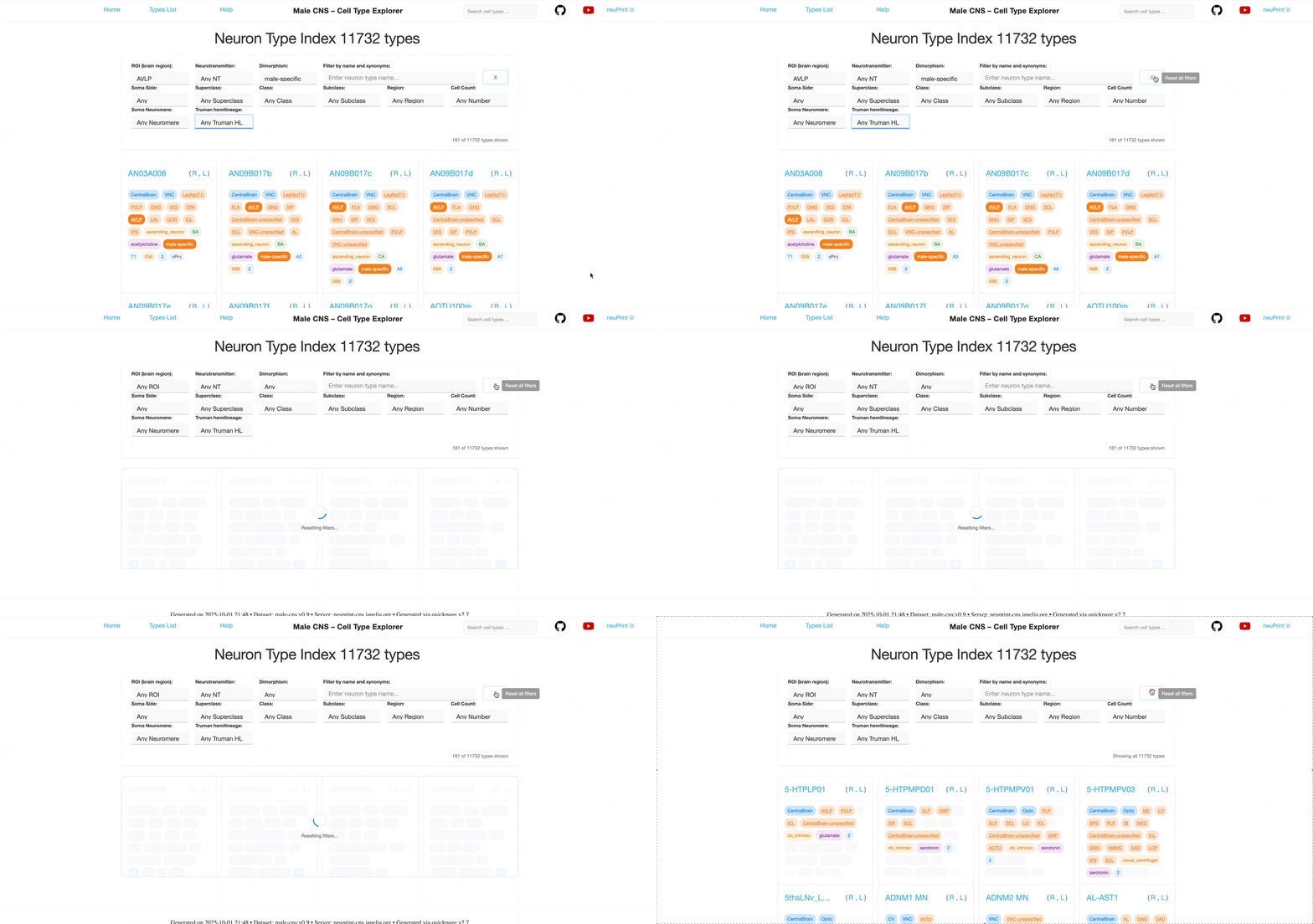
Search Functionality
The search bar in the header supports type‑ahead suggestions and is case‑insensitive. Start typing a neuron name to see matches. Results may include hemisphere variants (L/R/M/C). Search also matches known synonyms as well as the cell type's corresponding name in the FlyWire Female Adult Fly Brain (FAFB) dataset. You can explore this dataset in neuPrint , the FlyWire Codex or our corresponding FAFB Cell Type Explorer .
Individual Neuron Pages
Each neuron type has dedicated pages with comprehensive analysis and visualizations. Depending on the type and its hemisphere variants, neuron types may have a page for neurons whose soma is located in the right hemisphere (), left hemisphere (), or considered to be in the middle (). If the neuron type has instances with more than one side, there is also a combined page for all neurons of that type (). Use the buttons on the left side of the page or the menu (☰) to switch between views.
Header Information
The header shows the neuron type, the currently selected hemisphere variant as well as any associated synonyms.
Clicking on the link icon will take you to the relevant neurons' page in the neuPrint database for further exploration.
Summary Statistics
The summary section provides key quantitative information:
Neurons
The number of individual neurons of this type in the dataset. For bilateral neurons, counts reflect the number per hemisphere and log ratios show the balance across hemispheres.
Synapses
Combined post-synaptic (inputs) and pre-synaptic (T-bars, outputs), with breakdowns and log ratios where applicable. Technically, this number is a pre-calculated property for each neuron from the neuPrint database.
For combined pages the breakdown shows the total number of synapses assigned to each hemisphere and their ratio. Whereas for unilateral pages the breakdown and log ratio shows the number of post and pre synapses across all neurons of the type assigned to that side.
Connections
Combined upstream and downstream connections, with breakdowns and log ratios where applicable. Here, connections are the number of anatomical synapses between neurons. Technically, this number comes from the number of connected synapses, which are combined to form SynapseSets and assigned to Neurons within the neuprint database. A single pre-synaptic site (T-bar) can form multiple anatomical synaptic contacts with different post-synaptic partners. Each such contact counts as one downstream connection, so a neuron's number of downstream connections can exceed its number of pre-synaptic sites.
For combined pages the breakdown shows the total number of connections assigned to each hemisphere and their ratio. Whereas for unilateral pages the breakdown shows the number of upstream and downstream connections across all neurons of the type assigned to that side.
Neurotransmitter
Predicted neurotransmitter for the type and the corresponding confidence level (CL). For some types, the predicted neurotransmitter may be Unc for unclear.
Synapses per Neuron
Average number of synapses per neuron of this type. Useful for comparing connectivity levels.
For the combined page, the breakdown shows the mean number of synapses for neurons on the right and left. Whereas for unilateral pages the breakdown shows the mean number of pre and post synapses per neuron assigned to that side.
Connections per Neuron
Average number of connections per neuron of this type. Useful for comparing connectivity levels.
For the combined page, the breakdown shows the mean number of connections for neurons on the right and left. Whereas for unilateral pages the breakdown shows the mean number of pre and post connections per neuron assigned to that side.
Log Ratios
Log ratios (ld, base 2) indicate balance across hemispheres and inputs/outputs; values below 0 favor right/inputs and values above 0 favor left/outputs.
Layer and Column Coverage
Note: These views are only present for visual system neuron types with columnar organization.
Detailed analysis of neuron distribution across layers in visual system neuropils. This section explains how to interpret the “Mean Synapse Count per Layer” tables shown on individual neuron type pages (e.g., Tm3).
Mean Synapse Count per Layer
- Layer names and anatomical locations: Lamina (LA), Medulla (ME), Lobula (LO), Accessory Medulla (AME), Lobula Plate (LOP) and Central Brain (CB).
- Synapse counts: The values show the average number of pre and post synapses within that layer ROI per neuron of the type. Counts are aggregated from annotated synapse locations using standardized layer definitions for each neuropil.1
- Input vs. output balance per layer: Represented by the yellow (input) and blue (output) bars.
- Please note that these tables display synapse counts only for the ipsilateral optic lobe regions — that is, the lobe on the same side as the soma. For example, the “Tm3_R” page shows synapses of Tm3_R neurons within the right optic lobe. Consequently, neuron types that project exclusively to the contralateral optic lobe (e.g., DNc02) do not have layer tables. For bilateral neuron types (e.g., MeVPMe13), which innervate both optic lobes, the tables include only the counts for the ipsilateral synapses.
Population Spatial Coverage
Note: These Population Spatial Coverage maps are only present for visual system neuron types with columnar organization.
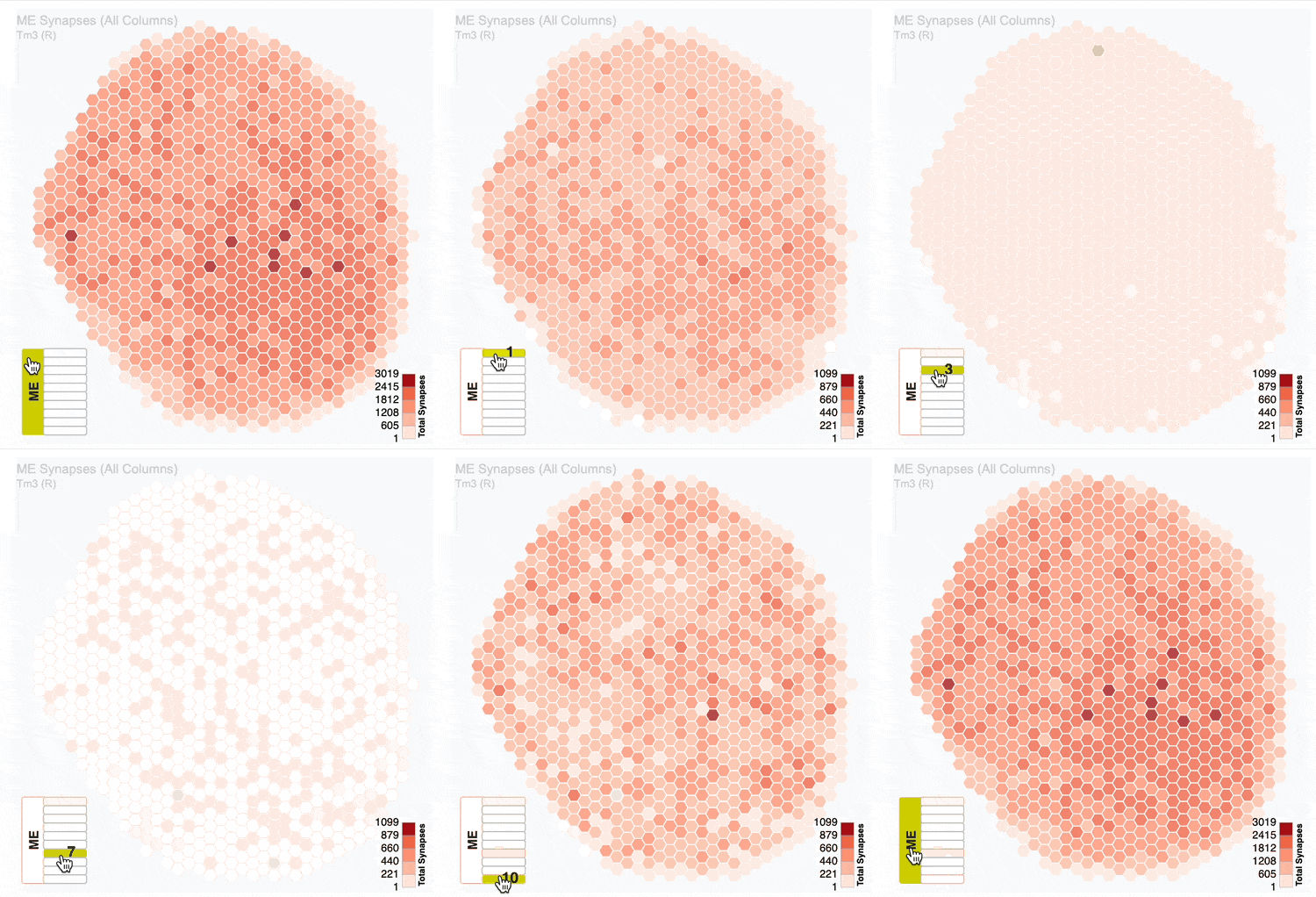
This section visualizes how a neuron type covers the columnar structure of visual system regions using interactive hexagonal grids.
The plots show the neural innervation of the ipsilateral medulla (ME), lobula (LO) and lobula plate (LOP).
- Column Analysis: Which columns within the ROI the neurons innervate.
- Regional Breakdown: Separate views for different regions (e.g., ME, LO, LOP)
- Color Coding: Intensity reflects connection strength or neuron density.
- Interactive Features: Hover over for details about the hexagonal column coordinate and cell or synapse count.
Neuron Visualization
Interactive 3D visualization of neuron morphology using the embedded Neuroglancer viewer:
Viewing the 3D Model
- Rotate: Left mouse button + drag. (Mac trackpad: click + drag.)
- Translate: Left mouse button + Shift + drag. (Mac trackpad: click + shift + drag.)
- Zoom: Ctrl + Mouse wheel (Mac trackpad: two finger pinch gestures)
- Select: Click on neurons to highlight and inspect
- Layers: Toggle reference layers on/off (as available). For example, the video below shows how you can use the "synapses" layer to view the synapses of the visible neurons.
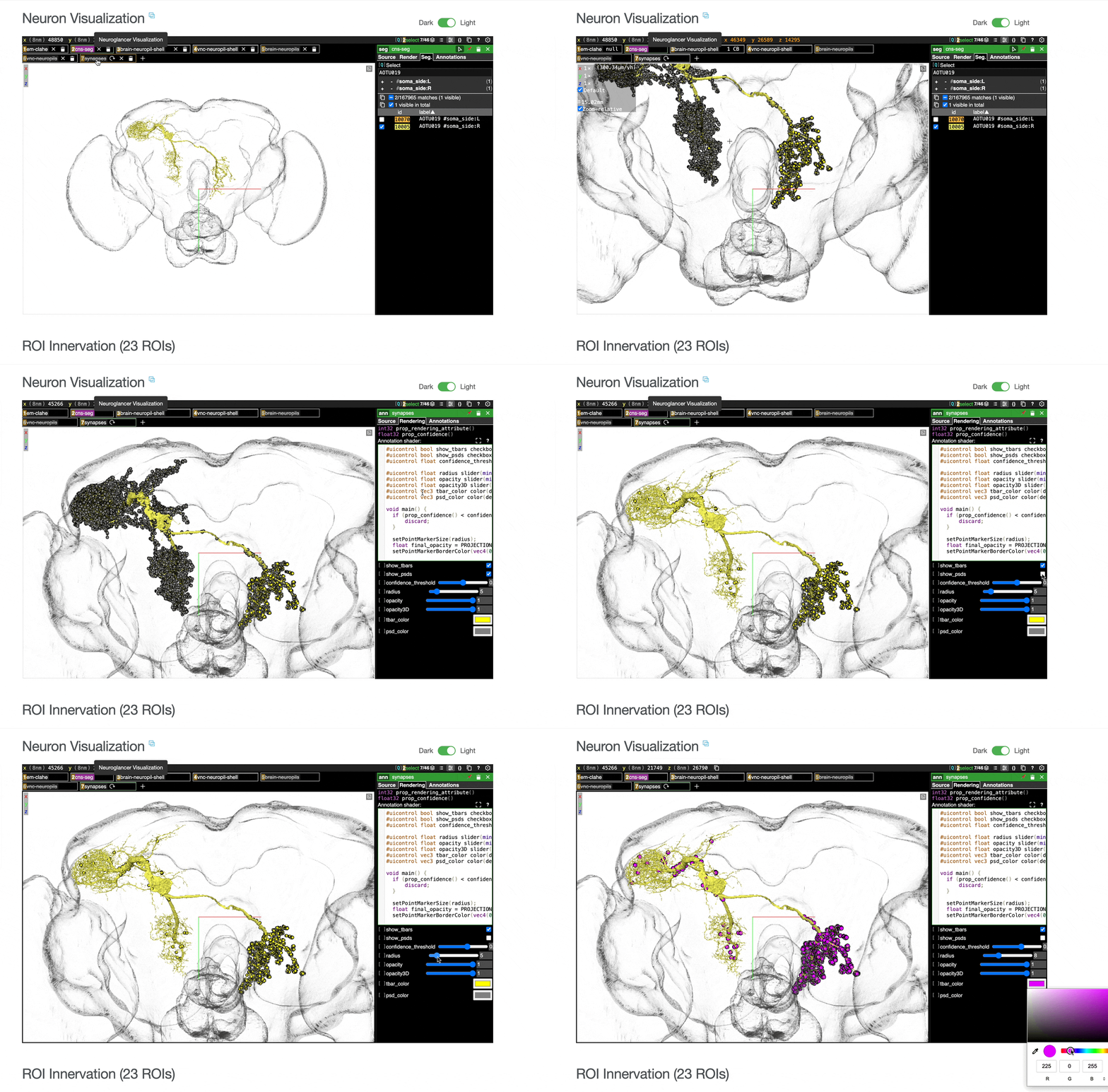
Keyboard shortcuts
- z - Reset to the closest axis.
- o - Toggle between orthographic and perspective projection.
- l - Reassign random colors to neurons and ROI meshes.
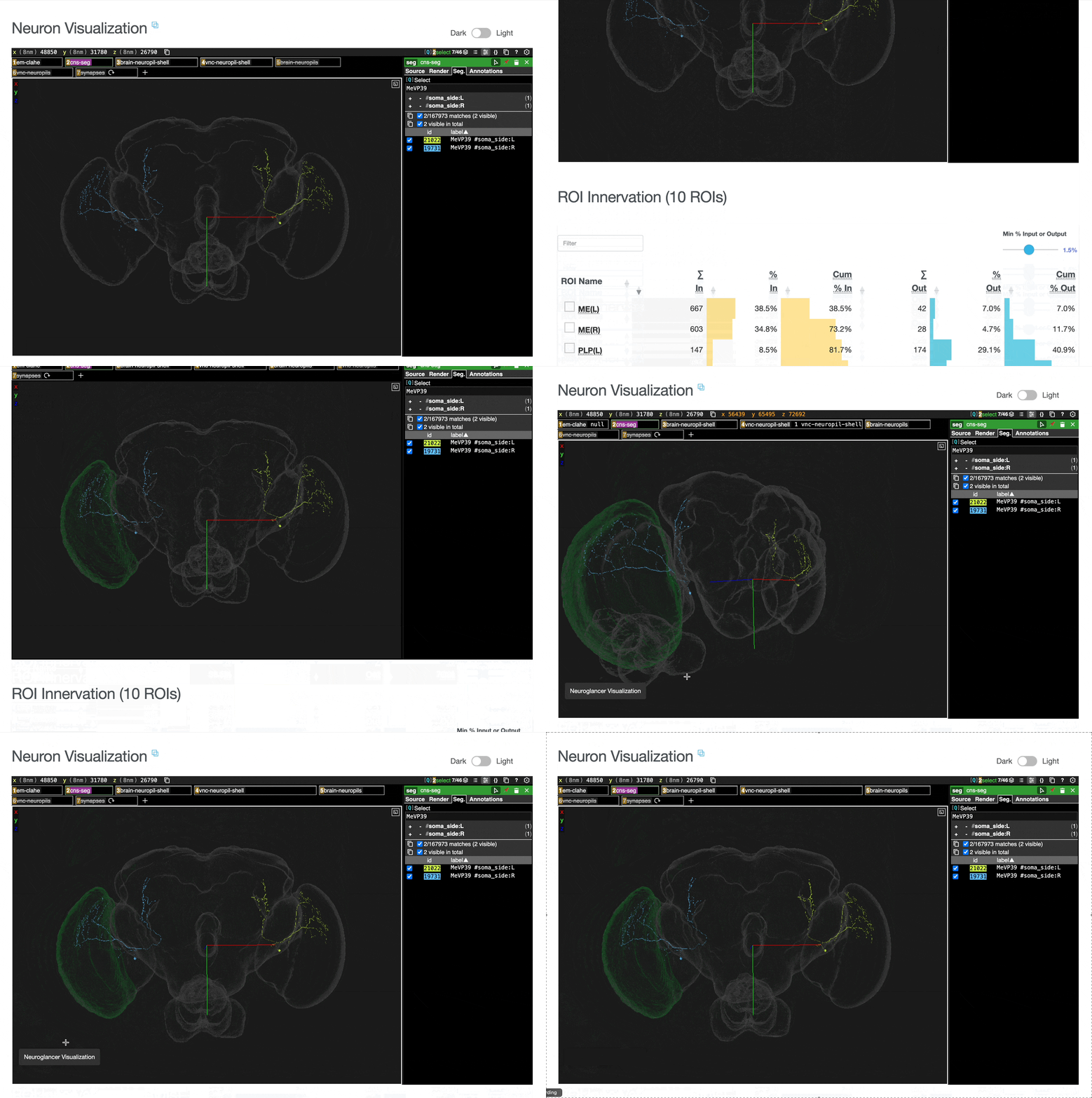
Adding ROI meshes from the ROI table
ROI meshes can be added to the neuroglancer view by selecting the blue checkbox within the ROI table. ROIs without checkboxes represent the few VNC ROIs that are currently unavailable to view within neuroglancer.
Adding Partners from the Connectivity table
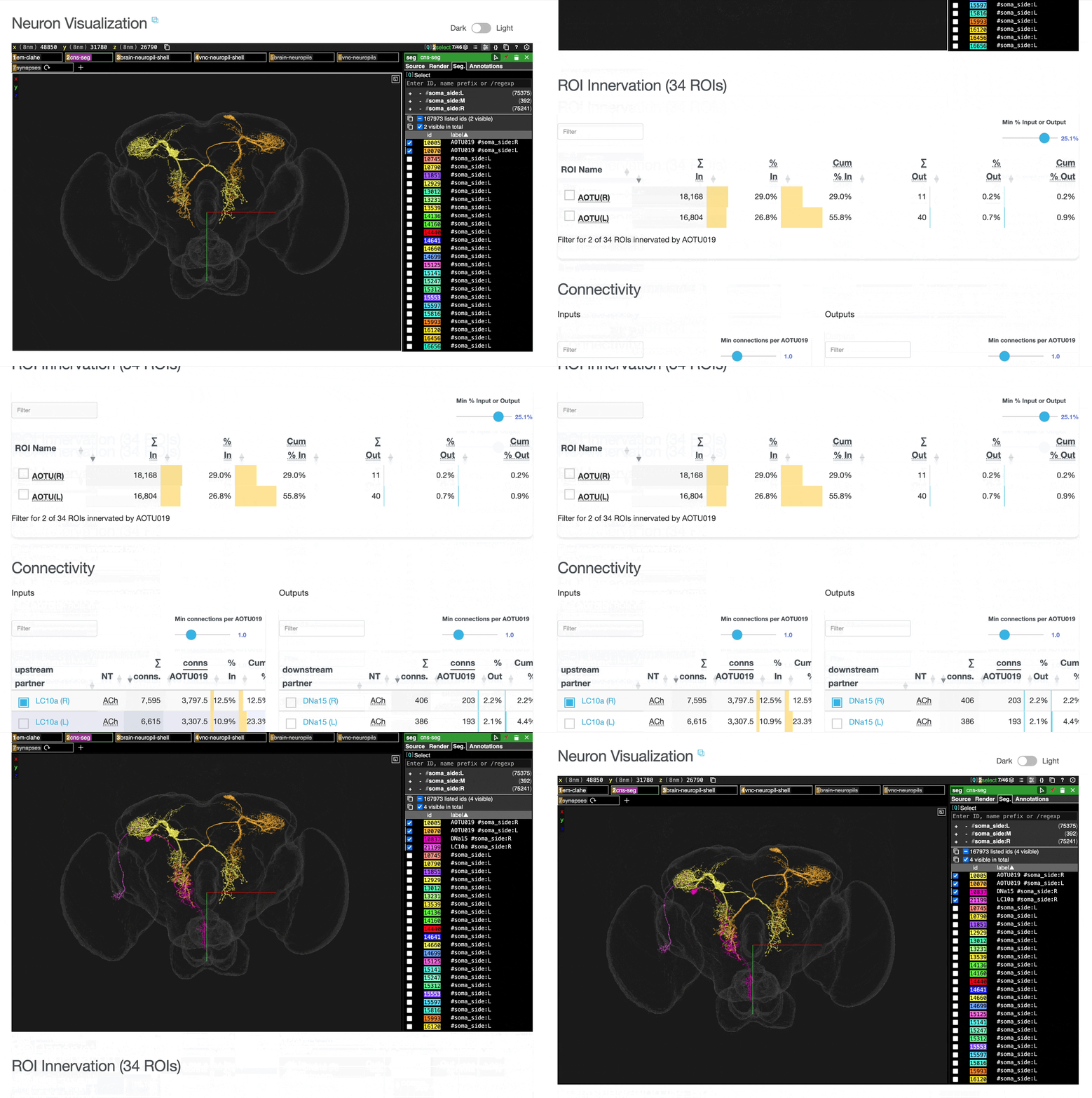
You can add connected partners to the 3D view directly from the Connectivity tables by selecting their blue checkboxes (see Connectivity section below). Some connected cell types have filled red checkboxes because there are no neurons of that type that directly innervate the example neuron visible by default in the neuroglancer view. A random neuron of that type can be added by searching for the type in the search box within the neuroglancer view and adding it manually.
External neuPrint Link
Direct link to view the same neurons in the full neuPrint interface for advanced analysis is provided on the page.
ROI Innervation
Detailed breakdown of connectivity within specific brain regions:
- Synapse Counts: Number of inputs and outputs in each ROI.
- Percentage Breakdown: Relative distribution across regions.
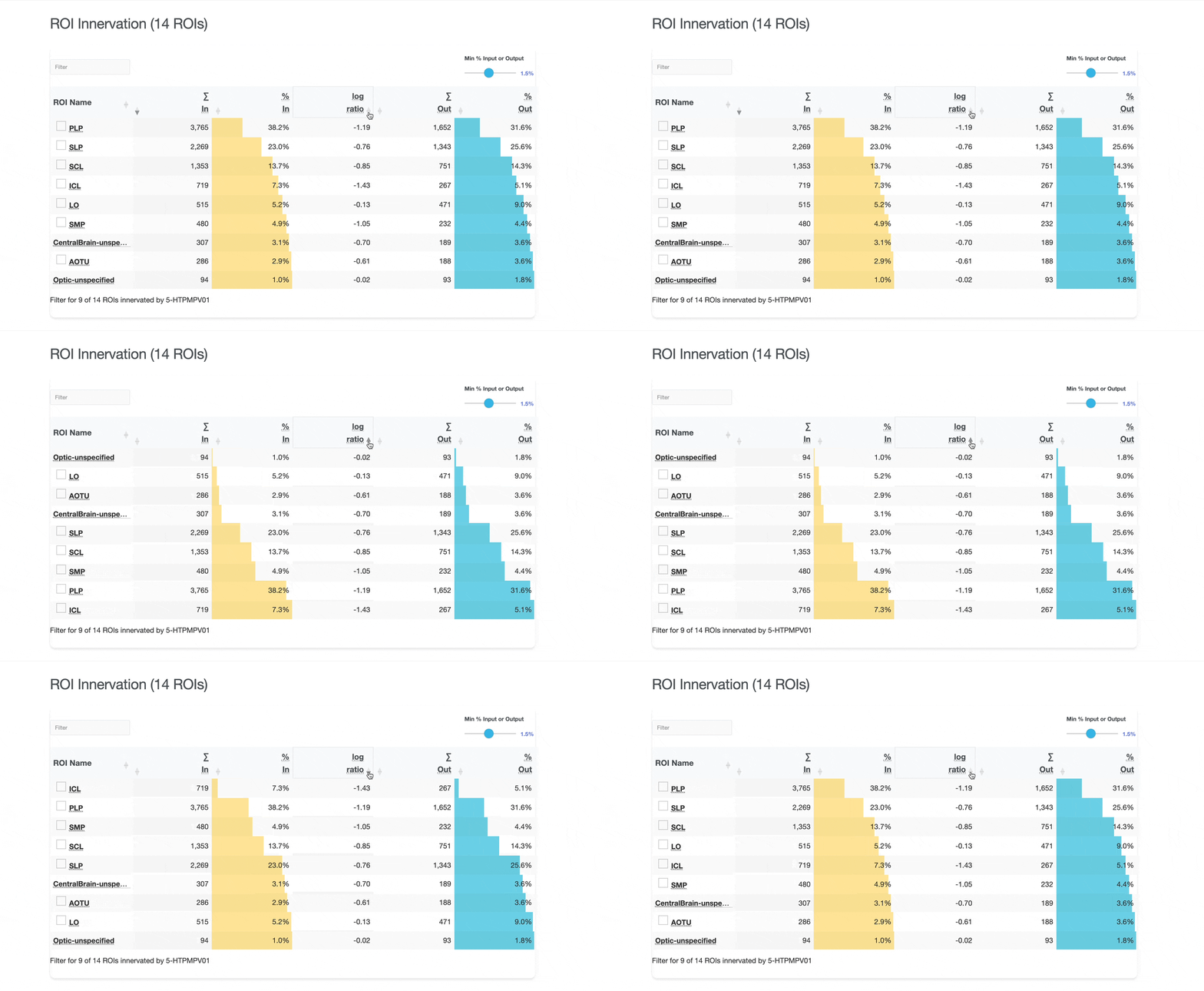
- Log Ratio: Ld (base 2) of inputs and outputs. Negative values indicate more inputs than outputs in that region. Positive values indicate more outputs than inputs.
Connectivity
Comprehensive analysis of synaptic connections with other neuron types:
- Upstream Partners: Neurons that provide input (pre-synaptic partners)
- Downstream Partners: Neurons that receive output (post-synaptic partners)
- Number of connected partners: The celltype count of the connected partners. Note: This is not the number of neurons of that type that act as upstream or downstream partners.
- Number of connections per neuron: Number of synaptic connections per target neuron.
- Percentage Contribution: Percentage of total synaptic connections to/from the target type.
- CV: Coefficient of variation for the number of connections per neuron.
Interactive Table Features
Both the ROI and Connectivity tables have a number of interactive features:
- Sort: Sort the table by a particular column by clicking on the column header.
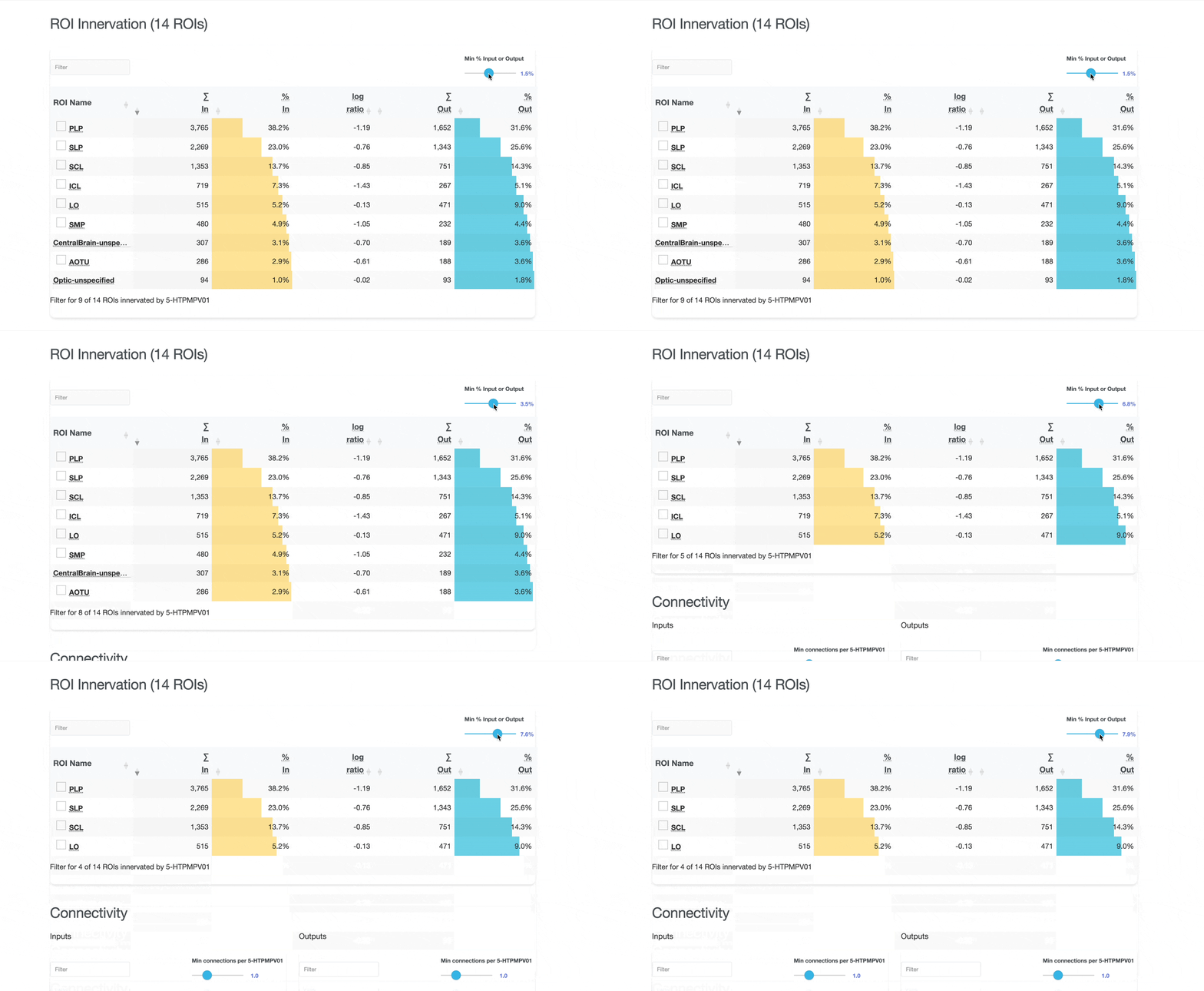
- Filter: Filter the table based on the percentage of input or output synapses within the region for the ROI table or the minimum number of connections per individual neuron of the target type for the connectivity table using the slider in the top right.
By default, the ROI table is filtered to show only the ROIs with at least 1.5% of all synapses and the connectivity tables to show types with at least one connection per neuron of the target type.
- Search: Search the table for a given string or number using the search box in the top left.
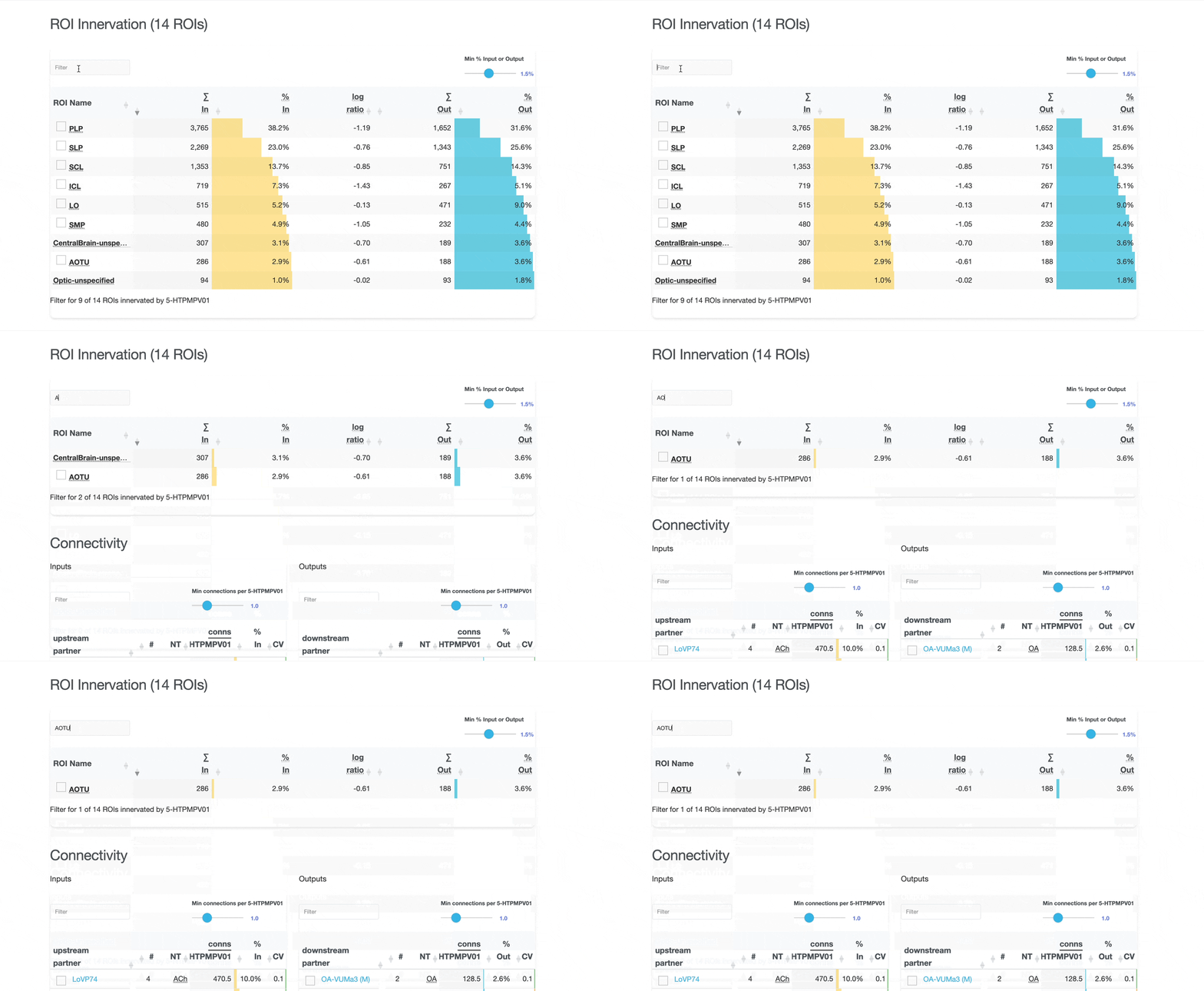
- Add meshes to the neuroglancer view: Click on the checkboxes to add either ROI meshes or a connected neuron of that type to the neuroglancer visualisation. See the adding connected partners or adding ROIs section to learn more.
- Jump to connected pages: Click on the partner type's name within the connectivity table to take you to that type's page.
Checkboxes and Neuroglancer Integration
- Each partner row has a checkbox.
- Blue (selected): adds one example of that partner neuron type to the Neuroglancer view.
- Red: the currently visualized neuron of the active neuron type does not have a connecting partner of that partner type in the current context.
- Gray (disabled): partner type matches the current neuron type and would add the same neuron instance already visible in the viewer (self-reference prevented).
Use these checkboxes to quickly visualize specific partners together with the current neuron in 3D. Disabled checkboxes prevent redundant visualization of the same neuron instances.
Terminology
Key terms and concepts used throughout the catalog:
- ROI (Region of Interest)
- Anatomically defined brain regions used to organize and analyze neural structures.
- Region
- A broader anatomical grouping that includes multiple ROIs.
- Side
- The hemisphere or location where the neuron's soma or root is located (Left, Right, Middle, or Undefined).
- Pre-synaptic / Post-synaptic
- Post-synaptic refers to inputs to a neuron, pre-synaptic refers to outputs from a neuron.
- Synapse Count
- The number of synaptic connections. Higher counts indicate denser connectivity. neuView uses the properties from the neurons in the database.
- Post-synaptic Sites
- Postsynaptic receptor sites where a neuron receives inputs from presynaptic partners. In the neuPrint data model, this is the
Neuron.postproperty. - Pre-synaptic Sites (T-bars)
- Presynaptic release sites where a neuron outputs signals, also called t-bars. In the neuprint data model, this is the
Neuron.preproperty. - Connections
- Input
upstreamconnections are conceptually similar to post-synaptic sites while one presynaptic site can connect to multipledownstreampostsynaptic partners. We calculate the number of connections by identifying the connecting neurons and then use theweightproperty from theConnectsToedge between the neurons. - Connections vs. Synapses
- The numeric difference between post-synaptic sites and input connections stems from the difference in how the numbers are retrieved (see Synapse Count and Connections above). A single presynaptic site (t-bar) can form multiple connections to different postsynaptic partners. Therefore, the number of output connections can be greater than the number of presynaptic sites.
- Inputs
- All pre-synaptic connecting cell types upstream from a given cell type (neurons providing input to the cell type).
- Outputs
- All post-synaptic connecting cell types downstream from a given cell type (neurons receiving output from the cell type).
- Log Ratio
- A logarithmic ratio (ld, logarithm dualis, base 2) used to quantify balance between two values (e.g., left vs. right hemisphere, inputs vs. outputs).
- Neurotransmitter (NT)
- Chemical messenger used by neurons to communicate across synapses.
- Cell Type Classification
- Hierarchy: Superclass → Class → Subclass, representing increasingly specific functional categories. This hierarchy is from Schlegel et al. 20242
- FlyWire
- Complementary dataset providing additional neuron identification and analysis.
- neuPrint
- The database and analysis platform containing the connectome data.
- Hemisphere variants (L/R/M/C)
- Pages can show Left (L), Right (R), Middle (M), or Combined (C) variants of a neuron type.
- Bilateral
- A neuron type with instances on both the left and right sides.
- Column / Ommatidium
- Repeated retinotopic units in the visual system referenced by column analyses and eye map visualizations.
- Retinotopy
- Mapping between positions in visual space and their representation on neural tissue.
- Truman Hemilineage
- A Truman hemilineage is a group of related neurons in the central nervous system (CNS) of the fruit fly (Drosophila), identified and categorized based on their developmental origin.
- Soma Neuromere
- The underlying segmental organization of the fly's ventral nerve cord (VNC) based on the position of the neuronal somas.
FAQ and Troubleshooting
- Why do some pages show “Middle” side?
- This is really a question for contributors to the neuPrint database. We observe three different "sides": right, left, and middle and report these assignment in the catalog. We classify neurons that are not assigned to one of these three "sides", as "undefined".
- Why don’t counts match neuPrint exactly?
- Differences in filters, dataset updates, or aggregation methods can lead to small discrepancies between this catalog and neuPrint.
- Why are some analyses unavailable for certain neuron types?
- Some analyses require sufficient morphology or annotation data; when unavailable, the section may be limited or omitted.
References
- 1 Nern, A., Loesche, F., Takemura, Sy. et al. Connectome-driven neural inventory of a complete visual system. Nature 641, 1225–1237 (2025). https://doi.org/10.1038/s41586-025-08746-0
- 2 Schlegel, P., Yin, Y., Bates, A.S. et al. Whole-brain annotation and multi-connectome cell typing of Drosophila. Nature 634, 139–152 (2024). https://doi.org/10.1038/s41586-024-07686-5
Contact and Feedback
Found an issue or have a suggestion? Please contact the development team.
Need More Help? Visit the neuPrint database for advanced analysis tools.